Dreamy Clouds Procreate Brushes: A Practical Evaluation for Digital Artists
In the ecosystem of digital illustration, the quality of your atmospheric elements often dictates the emotional resonance of a piece. For artists working within the Procreate app on iPad, achieving realistic or stylized skyscapes can be a time-consuming process involving complex layering and manual blending. The Dreamy Clouds Procreate Brushes set addresses this specific workflow challenge by offering a curated collection of stamps designed to streamline the creation of ethereal, volumetric, and soft cloud formations. This tool is not merely a decorative asset; it is a functional component intended to enhance efficiency without sacrificing artistic control.
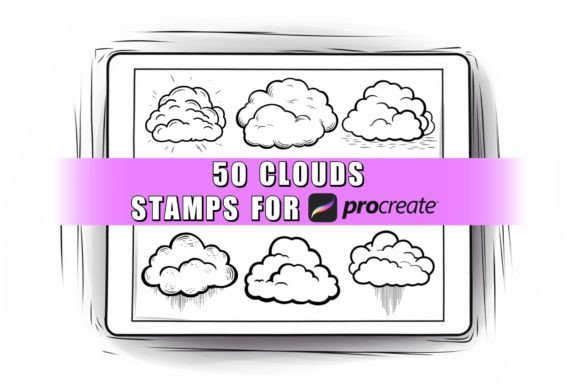
Designed specifically for the Procreate application on the iPad, these brushes leverage the precision of the Apple Pencil stylus pen. They are distributed in the standard .brushset format, ensuring seamless integration into existing projects. Unlike generic texture packs that may feel disjointed or low-resolution, this collection focuses on clean, easy-to-use stamps that respond naturally to pressure sensitivity and tilt, allowing for dynamic placement and scaling. Whether you are a professional illustrator constructing a background for a book cover or a hobbyist exploring landscape painting, understanding the mechanics and limitations of these tools is essential for maximizing their utility.
Core Functionality and Technical Specifications
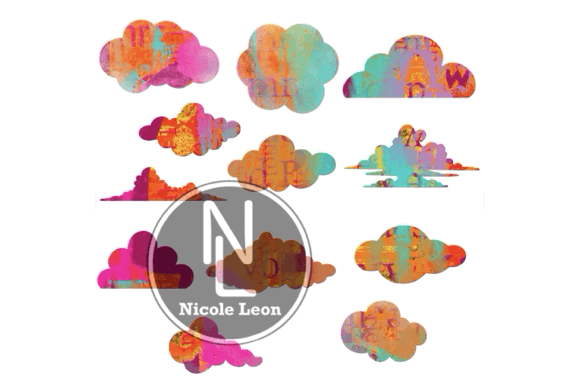
The primary value proposition of the Dreamy Clouds Procreate Brushes lies in their versatility regarding color and opacity. In traditional digital painting, creating clouds often requires switching between multiple brushes to achieve different densities and edges. This brushset consolidates those needs. Each stamp within the collection acts as a modular element. Users can apply them in any color palette, making them suitable for everything from golden-hour sunsets to stormy, monochromatic skies. The ability to adjust opacity allows for subtle atmospheric depth, where distant clouds fade into the horizon while foreground elements remain crisp and defined.
Technically, these assets are optimized for the Procreate engine. They are not compatible with other applications such as Adobe Fresco, Clip Studio Paint, or desktop software like Photoshop. This exclusivity ensures that the brush dynamics—such as grain, spacing, and flow—are calibrated perfectly for the iPad's rendering capabilities. The .brushset file structure means that once imported, the entire library becomes accessible through the Procreate brush drawer, organized for quick retrieval during the creative process.
Integration and Workflow Efficiency
Adopting new digital assets should never disrupt an established workflow. The installation process for the Dreamy Clouds Procreate Brushes is straightforward, adhering to standard industry practices for third-party Procreate resources. After purchase and payment confirmation, users receive an email containing a direct download link. This method avoids unnecessary intermediaries and ensures immediate access to the files.
Once the files are downloaded to the iPad, the import process is intuitive:
- Open the Procreate application on your iPad.
- Navigate to the Brush Library icon (represented by a paintbrush symbol).
- Tap the "+" icon located at the top left of the screen.
- Select "Import" and choose the downloaded .brushset file from your Files app.
Upon completion, the brushes appear in a dedicated folder within the library, ready for immediate use. This streamlined approach minimizes technical friction, allowing creators to focus on the artistic application rather than troubleshooting compatibility issues.
Evaluating Artistic Quality and Real-World Performance
When assessing digital brushes, the distinction between a "stamp" and a true "brush" is critical. Stamps, by definition, replicate a fixed image. However, high-quality stamp sets like the Dreamy Clouds Procreate Brushes mitigate the repetitive nature of cloning by offering varied shapes, sizes, and edge textures. In real-world testing, these brushes excel in scenarios requiring rapid background generation. For instance, an artist needing to populate a vast sky in a concept art piece can lay down base forms quickly, then refine them using Procreate's native smudge and blend tools.
The strength of this collection is its consistency. Lower-quality brush sets often suffer from jagged edges or pixelation when scaled up. The Dreamy Clouds Procreate Brushes maintain vector-like smoothness and resolution integrity even when resized significantly. This reliability is crucial for professionals delivering high-resolution assets for print media or large-format displays. Furthermore, the "dreamy" aesthetic implies a soft-focus characteristic, which aligns well with modern trends in fantasy illustration, children's book art, and social media content creation where soft, glowing atmospheres are highly valued.
However, users should be aware of the inherent limitations of stamp-based workflows. While efficient, relying solely on pre-made shapes can sometimes lead to a "sticker" effect if overused without modification. To achieve a truly organic look, experienced artists will likely combine these brushes with manual painting techniques. Using the Apple Pencil to trace over the edges of the stamped clouds or adjusting the flow settings within Procreate can help blend the stamps into the surrounding environment, eliminating any sense of artificiality.
Ideal Use Cases and Target Audience
The Dreamy Clouds Procreate Brushes are particularly beneficial for a diverse range of creatives. Professional illustrators and concept artists will appreciate the time-saving aspect, especially when working under tight deadlines for commercial commissions. Entrepreneurs and marketers who produce visual content for branding or advertising campaigns can utilize these tools to create cohesive mood boards or social media graphics without hiring external designers for every atmospheric element.
For educators and content creators teaching digital art, these brushes serve as excellent pedagogical tools. They demonstrate how to build complex scenes from simple components, helping students understand composition and lighting. Serious hobbyists also stand to gain significantly; the barrier to entry for creating impressive landscapes is lowered, allowing enthusiasts to focus on color theory and composition rather than getting bogged down in the tedious task of painting individual cloud wisps.
Specific situations where these brushes shine include:
- Landscape Painting: Quickly establishing sky backgrounds for plein air digital sketches.
- Fantasy Art: Creating magical, floating islands or ethereal realms where realism is secondary to atmosphere.
- Mood Boarding: Rapidly iterating on sky conditions to match the emotional tone of a project.
- Textile and Pattern Design: Incorporating cloud motifs into repeating patterns for fabric or wallpaper.
Long-Term Value and Considerations
Investing in digital assets requires considering their longevity. The Dreamy Clouds Procreate Brushes offer strong long-term value due to their adaptability. Because they function as flexible stamps rather than rigid effects, they do not become obsolete with changes in software versions, provided the Procreate app maintains backward compatibility with .brushset files. Their neutral design philosophy ensures they do not impose a specific style that might clash with future trends, making them a staple in a digital toolkit for years.
Nevertheless, potential buyers must acknowledge the platform restriction. These brushes are ONLY compatible with the Procreate App. If your workflow involves switching between iPad and desktop environments, or if you primarily work in Adobe Creative Cloud, this resource will not integrate into your pipeline. It is a specialized tool for the iPad ecosystem. Additionally, while the brushes are high-quality, they are a supplement to skill, not a replacement for it. The final output still depends heavily on the artist's ability to manipulate color, light, and perspective.
Ultimately, the decision to incorporate the Dreamy Clouds Procreate Brushes into your workflow should hinge on your specific need for atmospheric efficiency. For those seeking to elevate their sky rendering capabilities with minimal friction, this set provides a robust, reliable, and versatile solution. By balancing ease of use with professional-grade results, it stands out as a practical resource for anyone serious about digital illustration on the iPad.