Lens Flare Brushes: Elevate Your Digital Photography and Design
In the realm of digital photography and graphic design, lighting is often the defining factor between a good image and a masterpiece. While natural light captures the essence of a scene, it is not always possible to achieve the perfect cinematic glow or dramatic sunburst in-camera. This is where Lens Flare Brushes become an indispensable tool for creative professionals. These specialized assets allow artists to simulate the optical phenomena that occur when bright light sources interact with a camera lens, adding depth, atmosphere, and realism to digital compositions without the need for complex on-location shoots.
Understanding the Power of Lens Flare Brushes
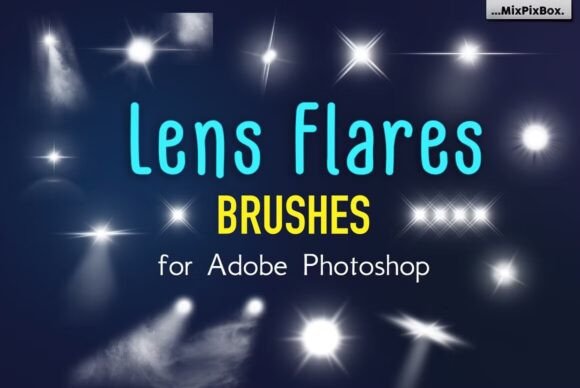
Lens Flare Brushes are pre-designed digital tools created for software like Adobe Photoshop. Unlike standard painting brushes that apply solid color or texture, these brushes replicate the intricate patterns of light refraction, ghosting, and streaks associated with real-world optics. When you select a lens flare brush, you are essentially loading a high-resolution stamp of light behavior that can be placed anywhere on your canvas. The result is an immediate transformation of a flat image into one that feels illuminated by a powerful light source.
The specific collection available today represents a significant leap in quality and utility. Designed for precision, this set features high-definition, ultra-clear brushes that span from 2500 to 5000 pixels each. This resolution ensures that even when zoomed in or used on large-format prints, the edges remain crisp and the light gradients stay smooth. With 21 finely crafted brushes included in the widely-used .abr format, users gain access to a diverse library of effects ranging from subtle glows to intense, multi-colored bursts. Because these tools synchronize flawlessly with all currently supported Adobe Photoshop versions, they offer a seamless integration into existing workflows, allowing for limitless artistic freedom.
Overcoming Common Creative Challenges
Many photographers and designers face specific hurdles when trying to enhance their work with light. One common challenge is the inability to control natural sunlight during a shoot. Weather conditions, time of day, or obstructions can prevent the capture of that desired "golden hour" feel. Another frequent issue arises in post-production, where manually painting light effects can be time-consuming and difficult to make look realistic. Creating a convincing flare from scratch requires a deep understanding of layer blending modes, opacity settings, and color theory, which can slow down the creative process significantly.
Furthermore, consistency is a major goal for commercial projects. A brand might need a series of images that all share a specific lighting aesthetic. Achieving this manually across dozens of photos is labor-intensive. Lens Flare Brushes address these situations by providing a standardized, high-quality solution. Instead of struggling to paint a realistic sunburst pixel by pixel, a designer can simply load the appropriate brush and apply it with a single click. This efficiency allows creators to focus on composition and storytelling rather than getting bogged down in technical execution.
How High-Resolution Brushes Solve Quality Issues
A critical aspect of modern digital art is scalability. Low-resolution assets often appear pixelated or blurry when enlarged, ruining the illusion of realism. The inclusion of brushes sized between 2500 and 5000 pixels in this collection directly tackles this problem. Whether you are designing a social media graphic or a billboard-sized banner, these high-definition tools maintain their integrity. The ultra-clear nature of the brushes ensures that the light transitions are smooth, avoiding the jagged edges that often plague lower-quality resources. This level of detail is essential for professional outcomes where every pixel counts.
Practical Applications and Real-World Outcomes
The versatility of Lens Flare Brushes extends far beyond simple photo retouching. They are fundamental tools across various creative disciplines. In product photography, a subtle flare can draw attention to a logo or highlight the contours of a luxury item, such as a watch or perfume bottle. In architectural visualization, these brushes can simulate the morning sun hitting a glass facade, adding warmth and life to a rendering that might otherwise feel sterile.
For motion graphics and video editors working within Photoshop's timeline or preparing assets for After Effects, these brushes serve as dynamic elements. By animating the position and size of a lens flare, creators can mimic the movement of a camera panning across a landscape. The outcome is a more immersive experience for the viewer, making static images feel alive and cinematic. Additionally, in concept art and illustration, lens flares are used to establish the mood of a scene instantly, signaling danger, hope, or mystery through the manipulation of light.
Tailoring the Approach for Different Users
While the core functionality remains the same, different users approach Lens Flare Brushes based on their specific goals and skill levels. Beginners often use them as a quick fix to add drama to a dull photo. They might select a bold, colorful flare and place it over a horizon line to create an instant sunset effect. For these users, the ease of use and the "plug-and-play" nature of the .abr format are the primary benefits.
Conversely, advanced professionals utilize these brushes as part of a complex compositing strategy. They might isolate specific parts of a flare, adjust the hue to match the ambient lighting of the scene, and change the blending mode to "Screen" or "Color Dodge" to integrate the light naturally. An expert might combine three or four different brushes from the 21-brush collection to build a custom, layered lighting effect that tells a specific story. This adaptability ensures that the toolset grows with the user, remaining relevant whether they are just starting out or refining a decade-long portfolio.
Recommendations for Implementation
To get the most out of your Lens Flare Brushes, consider a few practical recommendations. First, always pay attention to the direction of the light in your original image. If the sun is coming from the left, placing a flare on the right will break the illusion of reality. Consistency in light direction is key to maintaining believability. Second, experiment with opacity. A full-strength application can sometimes look artificial; reducing the opacity to 60% or 70% often yields a more subtle, atmospheric result that blends better with the underlying image.
Additionally, take advantage of the high resolution by using the brushes at varying sizes. Do not limit yourself to the default size; scaling the brush up or down can change the perceived distance of the light source. A small, sharp flare suggests a distant star or streetlamp, while a massive, soft burst implies a close-up sun. Finally, remember that these brushes are meant to be enhanced, not relied upon exclusively. Use them in conjunction with other adjustment layers, such as curves or color balance, to ensure the added light harmonizes with the overall color palette of your design.
Unlocking Limitless Artistic Freedom
The journey from a raw image to a polished, professional piece often hinges on the ability to manipulate light effectively. Lens Flare Brushes provide a bridge between technical limitation and creative vision. By offering a collection of 21 high-definition, user-friendly tools, they empower adults seeking practical solutions to overcome the constraints of traditional photography. Whether you are looking to add a touch of magic to a family portrait, create a striking advertisement, or develop a surreal digital artwork, these brushes offer the necessary components to bring your visions to life effortlessly.
Embracing these tools means entering a world where the only limit is your imagination. With the assurance of compatibility across Adobe Photoshop versions and the confidence that comes from using ultra-clear, high-resolution assets, you can focus on what truly matters: creating extraordinary designs that resonate with your audience. Let the light guide your creativity, and watch as your projects transform into something truly mesmerizing.