Procreate Ruffle Brushes Stamps: A Workflow Guide for Digital Fashion Illustration
In the realm of digital art, particularly fashion illustration, efficiency often dictates the difference between a fleeting idea and a polished portfolio piece. The Procreate Ruffle Brushes Stamps collection represents a significant leap forward for artists seeking to streamline their creative process without sacrificing detail or aesthetic quality. These assets are not merely decorative elements; they are functional tools designed to integrate seamlessly into a professional workflow, allowing creators to execute complex textures like ruffles, pleats, and fabric folds with a single tap.
For professionals, freelancers, and hobbyists alike, the ability to rapidly iterate on designs is crucial. Whether you are a fashion designer sketching initial concepts for a collection, a marketer creating social media visuals, or an educator teaching digital illustration techniques, the integration of specialized stamp brushes can transform your production timeline. This guide explores how to effectively implement these tools within your existing process, ensuring that your output remains high-quality, consistent, and uniquely yours.
Understanding the Role of Stamp Assets in Digital Workflows
Before diving into implementation, it is essential to understand where Procreate Ruffle Brushes Stamps fit within the broader scope of digital creation. In a traditional painting workflow, rendering realistic fabric texture requires hours of layering, blending, and manual brushwork. While this method offers total control, it is often time-prohibitive for projects requiring speed, such as rapid prototyping or content creation schedules.
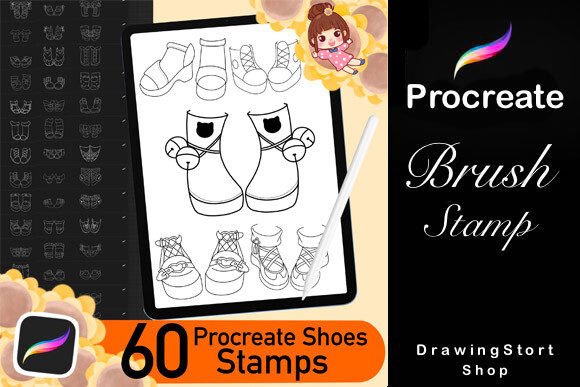
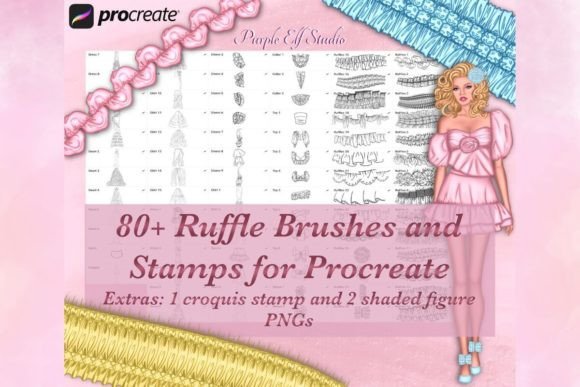
Stamp brushes function as pre-rendered assets embedded directly into the Procreate interface. When you select a specific brush from the set—such as one of the 80 included ruffle variations—you are essentially placing a high-resolution PNG element onto your canvas. However, unlike simple copy-paste operations, these brushes retain the dynamic properties of the Procreate engine. They respond to pressure sensitivity, rotation, and size adjustments, allowing for a level of customization that static images cannot offer.
This distinction is vital for understanding their utility. They serve as a bridge between vector-like precision and painterly texture. By utilizing these stamps, you shift your focus from the mechanical act of drawing every fold to the strategic placement and composition of the design. This shift allows you to spend more time on color theory, silhouette, and overall narrative, which are often the deciding factors in successful fashion illustrations.
Preparation and Compatibility Requirements
Successful integration of any digital asset begins with verifying compatibility. The Procreate Ruffle Brushes Stamps set is specifically engineered for the Apple ecosystem. To utilize these tools effectively, you must have access to an iPad running the latest version of the Procreate app. Furthermore, the use of an Apple Pencil is mandatory, as the pressure sensitivity and tilt features are integral to how these brushes behave on the canvas.
It is important to note that this product is a digital download delivered as a single ".zip" file. No physical items will be shipped. Upon receiving the file, the preparation phase involves extracting the contents and importing them into Procreate. This process typically takes only a few minutes but is critical for setting up your workspace correctly.
- Download and Extract: Save the .zip file to your iPad's Files app and unzip it to reveal the .brushset files.
- Import to Procreate: Open Procreate, navigate to the Brush Library, and import the new set by tapping the "+" icon and selecting "Import."
- Organization: Create a dedicated folder within your brush library labeled "Fashion Textures" or similar to keep your workspace organized. This ensures you can locate the specific ruffle stamp you need without cluttering your primary tool palette.
Ensuring your device meets these requirements prevents friction later in the workflow. Attempting to use these brushes on unsupported devices or older versions of the app may result in missing features or import errors, disrupting your creative momentum.
Strategic Implementation: Before, During, and After
The true power of the Procreate Ruffle Brushes Stamps lies in how they are deployed throughout different stages of a project. Understanding when to introduce these assets can significantly enhance the final outcome.
Phase 1: Conceptualization and Sketching
During the initial sketching phase, the goal is to establish the flow and drape of the garment. While you might start with basic line work, having the stamp brushes available early on allows you to test different fabric behaviors quickly. Instead of redrawing a skirt hem three times to get the right volume, you can apply a ruffle stamp, adjust its opacity, and see how it interacts with your croquis immediately. This rapid feedback loop helps in making faster decisions about the silhouette before committing to detailed rendering.
Phase 2: Rendering and Detailing
This is the primary stage for utilizing the full potential of the 80 included brushes. Once your line art is established, you can begin layering the ruffle stamps to build depth. The set includes various styles, from delicate lace-like edges to bold, voluminous pleats. By varying the size and rotation of the stamps, you can create a sense of movement and organic irregularity that mimics real-world textiles.
A key technique here is the use of layers. Place your stamp work on separate layers above your base color. This allows you to experiment with blending modes such as "Multiply" or "Overlay" to make the texture feel integrated into the fabric rather than pasted on top. You can also adjust the flow and opacity of the brush settings to soften the edges of the stamps, ensuring they blend naturally with hand-drawn shading.
Phase 3: Final Polish and Consistency
In the final stages, the focus shifts to consistency and quality control. Review your illustration to ensure the scale of the ruffles makes sense relative to the figure. One of the advantages of using a unified brush set is maintaining visual consistency across multiple pieces. If you are creating a series of illustrations for a brand or a lookbook, using the same set of stamps ensures that the texture language remains coherent throughout the collection.
Customization and Advanced Techniques
While the Procreate Ruffle Brushes Stamps provide a solid foundation, they are designed to be flexible. Artists should not view them as rigid constraints but as starting points for further customization. The Procreate app allows you to modify almost every aspect of a brush after import.
You can alter the color dynamics to match your specific palette, adjusting the hue, saturation, and brightness to suit the lighting conditions of your scene. Opacity controls allow you to create subtle, ghost-like textures for background elements or bold, saturated details for focal points. Additionally, you can combine these stamps with other brush types. For instance, using a soft airbrush alongside a sharp ruffle stamp can create a transition from hard edge to soft shadow, adding a three-dimensional quality to the illustration.
The inclusion of shaded figure PNGs and croquis stamps within the package further expands the workflow possibilities. These assets allow you to bypass the anatomical drawing phase entirely if your focus is strictly on garment design. You can place a shaded figure, apply your chosen ruffle stamps over the clothing areas, and refine the composition. This is particularly useful for entrepreneurs and marketers who need to produce high-volume content quickly without compromising on the professional look of the final image.
Workflow Efficiency and Long-Term Value
For busy professionals and small business owners, time is a finite resource. Integrating these brushes into your routine is an investment in long-term efficiency. By reducing the time spent on repetitive textural tasks, you free up capacity for higher-level creative thinking and business development. Whether you are preparing a pitch deck for a client, designing merchandise for an online store, or creating educational materials, the speed gained from using these assets translates directly into increased productivity.
Furthermore, the versatility of the set means it has a long shelf life. As trends in fashion evolve, the fundamental nature of fabric and texture remains constant. The 80 different variations included in the pack cover a wide spectrum of styles, ensuring that you have the right tool for diverse projects ranging from vintage-inspired sketches to modern streetwear concepts. Regularly revisiting and experimenting with the different brushes in the set can also spark new ideas and prevent creative stagnation.
Ultimately, the Procreate Ruffle Brushes Stamps are more than just a collection of digital files; they are a component of a streamlined, professional creative system. By understanding their capabilities, preparing your environment correctly, and applying them strategically throughout your project lifecycle, you can elevate the quality of your artwork while maintaining a sustainable and efficient workflow. The result is artwork that stands out, looks professional, and is ready for presentation in minutes rather than days.