Embroidery Stitches Procreate Brushes 2: A Practical Review
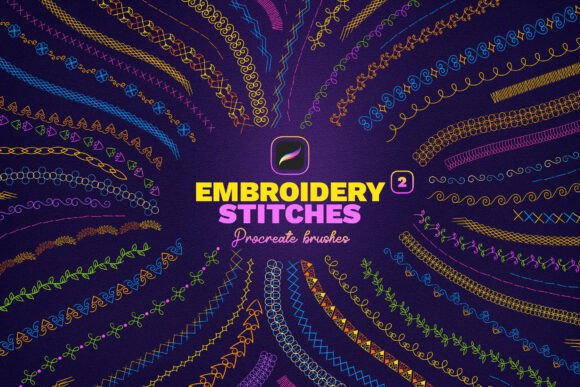
Digital artists and designers working within the Procreate ecosystem often face a specific challenge: bridging the gap between vector precision and organic texture. While standard brushes offer smooth lines, they rarely capture the tactile complexity of handcrafted textiles. This is where Embroidery Stitches Procreate Brushes 2 becomes a relevant tool for professionals seeking to integrate authentic textile aesthetics into their digital workflows. With a collection of 40 distinct brush presets, this asset set aims to replicate the look of real embroidery stitches directly on an iPad screen, offering a solution for those creating logos, patterns, or decorative elements that require a handmade feel.
The Core Functionality and Design Philosophy
The primary value proposition of Embroidery Stitches Procreate Brushes 2 lies in its ability to simulate physical thread behavior without the need for complex layering or manual texturing. In traditional digital illustration, achieving a realistic stitch effect often requires painting individual threads or using time-consuming clipping masks. This brush set streamlines that process by encoding the texture, spacing, and irregularity of various embroidery techniques directly into the brush engine.
The collection includes 40 different stitch effects, ranging from basic running stitches to more intricate satin and chain stitches. For a designer, this variety is crucial. A single type of stitch rarely suffices for a complete design; a logo might require a clean outline (satin stitch) while the background needs a textured fill (cross-stitch or French knots). By providing a diverse library, Embroidery Stitches Procreate Brushes 2 allows users to construct complex compositions quickly, maintaining consistency across different parts of the artwork.
The Duo-Color Advantage
A standout feature within this set is the inclusion of 18 Duo-Color Brushes. In physical embroidery, color blending is achieved by changing threads or using multiple strands simultaneously. Digitally, this usually involves creating separate layers for each color and masking them, which can clutter a canvas and slow down the creative process. The duo-color functionality in these brushes simplifies this significantly.
By selecting a main color and a secondary color, the artist can draw a single stroke that renders two tones simultaneously. This creates immediate depth and dimension, mimicking the way light hits raised threads or how different colored yarns interweave. For instance, when designing an embroidered patch, a user can create a shadowed edge and a highlighted center in one motion. This capability is particularly effective for creating intricate two-tone ornaments where the interaction between colors defines the visual weight of the piece.
Workflow Integration and Usability
One of the most significant factors in evaluating digital assets is how seamlessly they integrate into an existing workflow. Embroidery Stitches Procreate Brushes 2 adheres to the standard installation protocol for Procreate, ensuring minimal friction for users. The process is straightforward: download the files to the iPad, tap the .brushset file, and allow Procreate to import the assets automatically. Once installed, the brushes appear at the top of the brush list, ready for immediate use.
This ease of access is vital for professionals who are often working under tight deadlines. There is no need for external software or complicated configuration. The brushes are designed to be "easy to draw," meaning they respond intuitively to pressure sensitivity and tilt on the Apple Pencil. Users can control the density and flow of the stitches simply by varying their stroke speed and pressure, much like controlling the tension of a needle in real life.
Performance in Real-World Scenarios
In practical application, these brushes excel in specific contexts. They are particularly well-suited for:
- Brand Identity: Creating logos that convey craftsmanship, heritage, or artisanal quality. An embroidered texture adds a human touch that flat vector graphics often lack.
- Pattern Design: Developing repeatable patterns for fabric printing or actual embroidery production. The realistic nature of the stitches helps clients visualize the final textile product accurately.
- Decorative Illustration: Adding ornamental details to book covers, packaging, or social media graphics where a vintage or cozy aesthetic is desired.
- Patch and Badge Design: Designing custom patches for clothing or accessories, where the distinction between different stitch types is critical for the final manufacturing outcome.
However, it is important to note the limitations. While the brushes simulate the *look* of embroidery effectively, they do not generate machine code (like PES or DST files) required for industrial embroidery machines. These are artistic tools for visualization and design, not technical tools for production programming. Understanding this distinction is key to managing client expectations if you are selling designs intended for physical production.
Evaluating Quality and Consistency
The quality of a brush set is determined by how consistent the results are across different strokes and canvas sizes. Embroidery Stitches Procreate Brushes 2 demonstrates a high level of reliability. The stitch patterns maintain their integrity even when scaled up or drawn with varying speeds. Unlike some lower-quality assets that may result in smudging or unnatural repetition, these brushes utilize varied grain settings to ensure that no two strokes look exactly identical, preserving the organic randomness found in hand stitching.
The presentation of the brushes within the app is also logical. Grouping the 40 brushes by stitch type allows for quick navigation. When working on a detailed project, such as a complex ornament, the ability to switch rapidly between a fine detail brush and a broader fill brush without searching through menus enhances productivity. The duo-color feature, in particular, shows thoughtful engineering, as it manages color blending smoothly without requiring complex opacity adjustments.
Who Benefits Most?
This tool is most valuable for a specific segment of the creative community. It is ideal for freelancers and small business owners who specialize in surface pattern design, textile art, or branding. For educators teaching digital illustration, these brushes provide an excellent way to demonstrate texture and material simulation to students. Hobbyists who enjoy crafting but want to prototype ideas digitally before committing to physical materials will also find immense utility here.
Conversely, a graphic designer focused solely on corporate minimalist branding may find this set less relevant. If your work relies heavily on clean lines and solid fills, the added texture of embroidery stitches might conflict with your aesthetic goals. Therefore, the utility of Embroidery Stitches Procreate Brushes 2 is highly dependent on the specific visual language of your projects.
Long-Term Value and Creative Potential
Investing in a comprehensive brush set like this offers long-term value beyond a single project. Once installed, the brushes become a permanent part of your toolkit. As trends shift towards more organic, "slow fashion," and handmade aesthetics in the design world, having a reliable method to render these textures quickly becomes a competitive advantage. You can experiment with new ideas rapidly, testing how different stitch combinations affect the mood of a design without leaving your digital workspace.
Furthermore, the flexibility of the duo-color brushes encourages experimentation. Artists can push the boundaries of traditional embroidery looks by combining unexpected color palettes, creating modern interpretations of classic techniques. This potential for innovation ensures that the asset remains useful as your style evolves.
Final Considerations
In summary, Embroidery Stitches Procreate Brushes 2 is a robust resource for digital creators looking to add authenticity and texture to their work. With 40 varied effects and the unique ability to render two-tone designs effortlessly, it addresses a common pain point in digital illustration: the difficulty of simulating tactile materials. While it serves best as a design and visualization tool rather than a production file generator, its impact on the creative process is significant. For anyone with an iPad and Procreate who wishes to incorporate the warmth and intricacy of embroidery into their portfolio, this brush set offers a practical, efficient, and high-quality solution.
If you have questions about integrating these brushes into a specific workflow or need guidance on achieving certain effects, reaching out for support is recommended. Whether you are refining a logo or drafting a new pattern collection, unlocking the art of embroidery on your iPad can open new avenues for creative expression.